Technology Information

Raymond.CC Blog - Google Chrome and Opera Shows Hidden and Protected Operating System Files or Folders

Raymond.CC Blog - Google Chrome and Opera Shows Hidden and Protected Operating System Files or Folders


Google Chrome and Opera Shows Hidden and Protected Operating System Files or Folders

Posted: 01 Mar 2011 12:00 AM PST


A quick tip to share with you all since I’ve just discovered this. If you didn’t know, you can use your web browser to display or list files/folders on your local computer. This is very useful if you are on a computer that has restriction of drives being hidden. Do note that you can only [...]

Raymond.CC Blog - The Proper Way to Fully Install Intel Chipset Driver

Raymond.CC Blog - The Proper Way to Fully Install Intel Chipset Driver


The Proper Way to Fully Install Intel Chipset Driver

Posted: 28 Feb 2011 12:00 AM PST


When I was in my teens and started to learn about fixing computers, one of the first thing I remembered learning was the proper order to install drivers. Installing Windows now is much more simplified and easy compared to Windows 95/98 because we don’t need to use a DOS bootup floppy disk, and the vast [...]

"Why bother switching from GUI to NUI?", a question asked and answered by Josh Blake, plus my "2 cents" and some links.

"Why bother switching from GUI to NUI?", a question asked and answered by Josh Blake, plus my "2 cents" and some links.


"Why bother switching from GUI to NUI?", a question asked and answered by Josh Blake, plus my "2 cents" and some links.

Posted: 26 Feb 2011 03:36 PM PST

In Chapter 1 of Natural User Interfaces in .NET,  Josh Blake asks and answers a question posed by many people who have been under the spell of keyboard input and GUI/ WIMP interaction: 


Why bother switching from GUI to NUI?  The answer?  Read Chapter 1 (pdf) of the book - the chapter is free.


Here are a few of my personal reasons:  
1.  I want to buy the next version of the iPad or something like it.

2.  I want to buy a new large-screen Internet HD TV.
3.  I want to buy a Kinect.
4.  I do NOT want to interact with my new TV with a Sony remote.  Too many tiny buttons!


5. I do NOT want to interact with my new TV with a keyboard,  because it reminds me of...work.

6.  Most importantly: 

I want to design apps for the people I care about, and others with similar needs:
    My mom.  
    My grandson.
Moms and dads with kids in tow.
People with special needs and/or health concerns, and the people who care and guide them.
Knowledge sharers and (life-long) learners....

RELATED

"Smart" Interactive Display Research


Josh Blake's Blog: 
Chapter 1 (pdf)  Free!

"Blake.NUI is a collection of helpful controls, utilities, and samples useful for multi-touch and NUI development with WPF, Surface, and Silverlight."
Madhav K, KinectHacks 1/14/11
Mike Martin, TechNews World, 2/22/11
Encyclopedia:  Human Computer Interaction, Interaction Design, User Experience, Information Architecture, Usability and More (Interaction-Design.org)
 (This is not an inclusive list.)

A little off-topic: Slideshow of my cell phone camera effects experiments at Amelie's French Bakery, NoDa, Charlotte, NC.

Posted: 26 Feb 2011 05:32 AM PST

I dropped my nephew off at the airport before the crack of dawn this morning, and took the opportunity to visit Amelie's French Bakery in the NoDa neighborhood of Charlotte (NC). The croissant was awesome and the coffee hit the spot. It occurred to me that I'd never checked out the camera effects features on my cellphone.

Below is a slideshow of my experiments - there are many pictures of the same "scene", with different effects. (The flash was on for some of the pictures, and off for others.)

Raymond.CC Blog - Replace Multiple Remotes with Logitech Harmony One Advanced Universal Remote

Raymond.CC Blog - Replace Multiple Remotes with Logitech Harmony One Advanced Universal Remote


Replace Multiple Remotes with Logitech Harmony One Advanced Universal Remote

Posted: 26 Feb 2011 12:00 AM PST


Everyone loves gadgets but not everyone can afford or willing to spend on them since they are not a necessity. I personally love gadgets too and I only buy what I think is necessary. The latest gadget that I bought recently is the Logitech Harmony One Advanced Universal Remote. The name of the gadget itself [...]

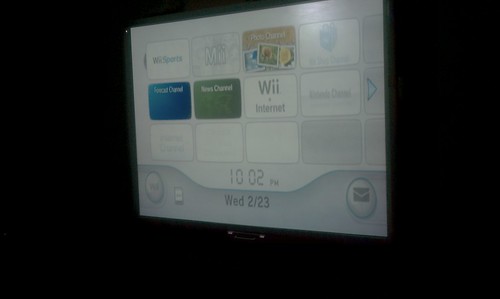
Today I hooked up a Wii to the IWB in the school's therapy room. Next - a Kinect?! (Angels are welcome to help us expand the school's "games" programs for students with special needs)

Today I hooked up a Wii to the IWB in the school's therapy room. Next - a Kinect?! (Angels are welcome to help us expand the school's "games" programs for students with special needs)


Today I hooked up a Wii to the IWB in the school's therapy room. Next - a Kinect?! (Angels are welcome to help us expand the school's "games" programs for students with special needs)

Posted: 24 Feb 2011 03:35 PM PST


Today, I hooked up our school's Wii to the newly-installed IWB in the therapy room for the first time, and used it during a session for for a social-skills activity with two students who have autism spectrum disorders.  The students helped each other to create their own "Mii" avatars.  I had them play the bowling game, and was impressed how this activity elicited social conversation between the students, with minimal effort on my part.

Most of students in the program at Wolfe are in grades 6-12. They have cognitive, language, and motor delays.  A good number of the students also have autism spectrum disorders. Some have multiple special needs.

We have found that when our students are provided with interactive activities displayed on the large screen of an IWB, they tend to increase their level of attention to their peers and also communicate more with one-another, as well as with the teachers and staff.

By using an IWB for games at school, we are extending the reach of how this technology can be used with students who have more complex special needs.   By providing a means  for our students to learn to play positive games, we help them develop important physical, social, and leisure skills that they can use outside the school setting with non-disabled peers and siblings.  My hunch is that the games will also help promote cognitive/problem solving skills, too.

NOTE:
The funds to purchase the Wii were donated to our school, but did not cover additional games or accessories. We'd like to purchase Rock Band and Wii Fit. We'd also like to expand our program and purchase an Xbox with a Kinect.   An iPad or two would be OK, too : )

If there are any angels out there who'd like to donate funds for our "games" program at Wolfe, please contact me through my Google profile. I will connect you with the appropriate person.

Game designer/developers/researchers/students:
If you are interested in volunteering your efforts to work on a basic cooperative, pro-social game for the Kinect, SMARTTable, or interactive whiteboard, please contact me.


NCSU D.H. Hill Library has a Perceptive Pixel Multitouch Display (updated)

Posted: 24 Feb 2011 02:23 PM PST

NCSU 'sandbox' lets students touch the technology
Jay Price, Charlotte Observer, 2/22/11


"The Perceptive Pixel display wall, which was switched on this week, is the $100,000 centerpiece of the new Technology Sandbox at the D.H. Hill Library. The sandbox is a room of cutting-edge, interactive hardware that's aimed partly at familiarizing students with the latest high-tech hardware, particularly large displays and gesture-based computing. It was paid for with a federal grant from the Institute of Museum and Library Services that is administered by the State Library of North Carolina."


Credit: Corey Lowenstein - clowenst@newsobserver.com

RELATED
Technology Sandbox introduces NCSU students to latest gadgets
WRAL Techwire, 8/25/10
New Learning Spaces for New Learning Styles (pdf)
Terry B. Hill, Mohan Ramaswamy,  NCSU

HUNT LIBRARY


North Carolina State University Libraries
Perceptive Pixel

Enter your mail address:
Template by - ADMIN | HiTechvnn Template