Technology Information

UDATE: CALL FOR PAPERS: Workshop on UI Technologies and Educational Pedagogy, Child-Computer Interaction (in conjunction with CHI 2011, May)

UDATE: CALL FOR PAPERS: Workshop on UI Technologies and Educational Pedagogy, Child-Computer Interaction (in conjunction with CHI 2011, May)


UDATE: CALL FOR PAPERS: Workshop on UI Technologies and Educational Pedagogy, Child-Computer Interaction (in conjunction with CHI 2011, May)

Posted: 29 Dec 2010 08:33 PM PST


CALL FOR PAPERS
 
Child Computer Interaction: 
in conjunction with CHI 2011, Vancouver, Canada
May 8th 2011

Topic: Given the emergence of Child Computer Interaction and the ubiquitous application of interactive technology as an educational tool, there is a need to explore how next generation HCI will impact education in the future. Educators are depending on the interaction communities and to deliver technologies that will improve and adapt learning to an ever- changing world. In addition to novel UI concepts, the HCI community needs to examine how these concepts can be matched to contemporary paradigms in educational pedagogy. The classroom is a challenging environment for evaluation, thus new techniques need to be established to prove the value of new HCI interactions in the educational space. This workshop provides a forum to discuss key HCI issues facing next generation education.

We invite authors to present position papers about potential design challenges and perspectives on how the community should handle the next generation of HCI in education. Topics of interest include:

  1.  Gestural input, multitouch, large displays, multi-display interaction, response systems

  2.  Mobile Devices/mobile & pervasive learning

  3.  Tangible, VR, AR & MR, Multimodal interfaces, universal design, accessibility

  4.  Console gaming, 3D input devices, 3D displays

  5.  Co-located interaction, presentations, tele-presence, interactive video

  6.  Child Computer Interaction, Educational Pedagogy, learner-centric, adaptive "smart" applications

  7.  Empirical methods, case studies, linking of HCI research with educational research methodology

  8. Usable systems to support learning and teaching: Ecology of learning, any where, anytime, (UX of cloud computing to support teaching and learning)

Submission: The deadline for workshop paper submissions is January 14, 2011. Interested researchers should submit a 4-page position paper in the ACM CHI adjunct proceedings style to the workshop management system. Acceptance notifications will be sent out February 20, 2011. The workshop will be held May 7 or May 8, 2011 in Vancouver, Canada. Please note that at least one author of an accepted position paper must register for the workshop and for one or more days of the CHI 2011conference.


Contact: Edward Tse, SMART Technologies, edwardtse@smarttech.com


WORKSHOP ORGANIZERS
Edward Tse, SMART Technologiess
Johannes Schöning, DFKI GmbH
Yvonne Rogers, Pervasive Computing Laboratory, The Open University
Jochen Huber, Technische Universität Darmstadt
Max Mühlhäuser, Technische Universität Darmstadt
Lynn Marentette, Union County Public Schools, Wolfe School
Richard Beckwith, Intel

ūmi from Cisco - Forget about the video phone, why not try home teleconferencing on your huge HDTV?

ūmi from Cisco - Forget about the video phone, why not try home teleconferencing on your huge HDTV?


ūmi from Cisco - Forget about the video phone, why not try home teleconferencing on your huge HDTV?

Posted: 27 Dec 2010 11:34 AM PST

You've probably seen the series of commercial for ūmi telepresence featuring Ellen Page. In one, she's trying to learn how to play the spoons.  In another, she's engaging in a tea party.  The one I like the best is when she tries to "telepresentlyconverse with her friend, Steve.   From what I can tell from the commercials and the Cisco website, I think that the ūmi is a much better option than the video phones that have been brought to market over the past two years!

If you want to be telepresent, and if you have $599.00, you can add a ūmi to your cart while visiting the CISCO ūmi telepresence website. With free shipping and a 30-day return policy, why not try it? If your friends and relatives have a laptop and Google Chat, you can still use your ūmi  with them.  (My hunch is that the experience is much better if both parties have a ūmi.)

It might cost a bit more than $599.00 to get your ūmi up and running. First of all, you'll need to have an HDTV with an HDMI input port, with a resolution of 1080p, or 720p. You also need to have a top-tier broadband connection to the Internet if you have a 1080p HDTV, which requires a minimum of 3.5 Mbps upload/download speed. If you have a 720p HDTV, you'll need a minimum of 1.5 Mbps upload and download speed.

FYI: I connect to the Internet from my computer on the second floor of my home via a wireless router, located on the first floor. My upload speed is just 0.965 Mbps, which is not fast enough for the ūmi. My download speed is 8.991 Mbps, which is more than I need. I checked Time Warner Cable and found out that they now offer Wideband, with download speeds up to 50 Mbps, with upload speed up to 5 Mbps.  If I really, really want a ūmi, I'll have to solve this problem with Time Warner/Roadrunner.

The following video has a short discussion of TV UI and usability testing- they tossed a bag of rice at the TV to simulate a cat jumping at the screen....

In the Lab: The Innovators Behind Cisco ūmi


Below are a couple of videos about the ūmi from Cisco's YouTube site:


RELATED
Wikipedia's definition of telepresence:
"Telepresence refers to a set of technologies which allow a person to feel as if they were present, to give the appearance that they were present, or to have an effect, via telerobotics, at a place other than their true location."
Cisco Broadband Speed Test
Cisco Blog
How is your network running?
Brenna Karr, Cisco Blog 12/17/10
Previous post:  Like Neil Steinberg once said, "Dude, Where's My Video Phone?"
Dude, Where's My Video Phone?
Neil Steinberg, Forbes, 10/15/07

Hans Rosling Interacts with Health Data: 200 Countries, 200 Years, 4 Minutes

Hans Rosling Interacts with Health Data: 200 Countries, 200 Years, 4 Minutes


Hans Rosling Interacts with Health Data: 200 Countries, 200 Years, 4 Minutes

Posted: 23 Dec 2010 06:54 AM PST

Hans Rosling's enthusiasm for data visualization has increased my appreciation for statistics. In the video below, Rosling interacts with 120,000 data points related to 200 countries over 200 years. I especially like the "Alternate Reality" effect.


"Unveiling the beauty of statistics for a fact based world view"

Hans Rosling is a Professor of Global Health in Stockholm, Sweden, and the Director of the Gapminder Foundation.  The Gapminder World website has a wealth of resources for teachers, students, and anyone who is interested in learning about things through the use of information visualization. 

According to information from the website, "Gapminder is a non-profit venture – a modern "museum" on the Internet – promoting sustainable global development and achievement of the United Nations Millennium Development Goals.Gapminder was founded in Stockholm by Ola Rosling, Anna Rosling Rönnlund and Hans Rosling on February 25, 2005. Gapminder is registered as a Foundation at Stockholm County Administration Board (Länstyrelsen i Stockholm) with registration number (organisationsnummer) 802424-7721."


Below is a list of annotated links to various Gapminder webpages:

Gapminder Labs: "Gapminder Labs is where we experiment with new features, visualizations and tools. Some of these might later gain a more prominent place on Gapminder.org."

Gapminder for Teachers: "This section is for educators who want to use Gapminder in their education. You'll find shortcuts to tools and guides for Gapminder in a classroom."


Gapminder Downloads: This section includes links to downloadable content, such as Gapminder Desktop, handouts, lesson plans, including teacher guides, and a good number of interesting interactive presentations.

Gapminder Videos: The videos include interesting presentations as well as a number of Hans Rosling's TED talks. The material is free to use and distribute under the Creative Commons License.


Data in Gapminder World:  This section includes all of the indicators displayed in Gapminder World.

Gapminder World

Gapminder FAQs

Teach Parents Tech website by Google employees - gotta love it - it includes tech "how-to" care package videos!

Teach Parents Tech website by Google employees - gotta love it - it includes tech "how-to" care package videos!


Teach Parents Tech website by Google employees - gotta love it - it includes tech "how-to" care package videos!

Posted: 22 Dec 2010 11:16 AM PST

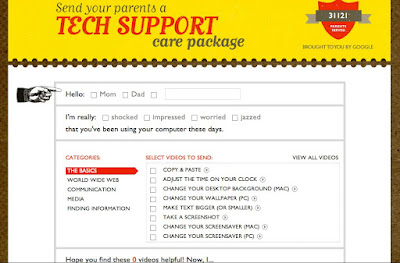
Google employees know what it is like to play the role of the extended family tech support person.  For the holidays- and beyond - they've created a series how-to videos that might prove to be useful to parents  and other extended family members who are interested in joining World 2.0 but need some sort of useful roadmap.


Teach Parents Tech is a great website to visit to learn the basics and a bit more. Here is the introductory video:


There is a "how-to"video for nearly everything.  Below is a screen shot of the home page, that lets you create a customized tech support "care package" that you can email to a parent:


Multi-touch SmartBoard! (SMARTBoard 800 Series)

Posted: 22 Dec 2010 09:59 AM PST

Take a look at the video demonstration of the new SMARTBoard (800 series) that offers multi-touch and gesture interaction support so that two students can interact with the board at the same time.

  • Students can use 2 finger gestures to enlarge objects and move them around.
  • Two students can interact with the board at the same time to complete activities.
  • SMARTInk/Calligraphic Ink creates stylized print as you write. Whatever is written or drawn on the SMARTBoard becomes an object in the SMARTNotebook, allowing for things to be resized or rotated.   (2:04)
  • Multi-touch gestures enabled in Window 7 and Snow Leopard work with the SMARTBoard.
  • Software development kit (3:28):  Example of a physics application developed by a 3rd-party developer.  The application supports two students working at the SMARTBoard at the same time
This video, in my opinion, does not provide viewers with the full range of possibilities that the new features provide.   I'd like to see a "redo" of this video using a live teacher and a group of students.  For example, it would be interested in seeing how the physics application would be incorporated into a broader lesson or science unit.   I'd love to hear what real students have to say as they interact with the physics application, too.

Comment:
I think a multi-user interactive timeline would be a great application for the new SMARTBoard, because students could work together to create and recreate events.  This would be ideal for history, literature, and humanities activities, across a wide span of grade levels.

Video School Online: Free from Vimeo

Posted: 22 Dec 2010 06:53 AM PST

Prosumers, DYI, hobbyists, multimedia wannabes, and even a few film or video pros might want to take a look at Vimeo's Video School Online. 


I'd like to use a dolly for a couple projects, and found the following video on the Vimeo Video School website that gives a great step-by-step demonstration of how to make your very own dolly for about $45.00:

My DIY Dolly from Knut Uppstad on Vimeo.


Interesting animation made with Google Docs presentation app. (Google Demo Slam), via Flowing Data

Posted: 22 Dec 2010 05:36 AM PST

The video below was an entry in the Google Demo Slam,  an effort started by Google to share the word with the world about their innovative technologies.  By the time I learned of Epic Docs Animation, the video had over 800,000 views.  I plan to view a few more Google Demo Slam videos over the holiday break!


-Tu+, Namroc, and Metcalf 

For more information and Demo Slam videos, visit Google's Demo Slam website: "Welcome to Demo Slam, Where Amazing Tech Demos Battle for Your Enjoyment"

RELATED
Epic animation in Google Docs
Nathan Yau, Flowing Data, 12/22/10
Google's rationale for creating Demo Slam:
"We spend our time making a whole bunch of technologies that are free for the world, but a lot of people dont even know about them. And that kind of sucks. So, we thought organizing the world's most creative tech demo battle would be a great way to help spread the word and teach people about tech. Not to mention, it is a lot of fun."
About Demo Slam
Hall of Demo Champs

"Design is the Solution-From Visual Clarity to Clarity in the Mind" (gem of an article by Gerd Waloszek, SAP User Experience)

"Design is the Solution-From Visual Clarity to Clarity in the Mind" (gem of an article by Gerd Waloszek, SAP User Experience)


"Design is the Solution-From Visual Clarity to Clarity in the Mind" (gem of an article by Gerd Waloszek, SAP User Experience)

Posted: 14 Dec 2010 04:26 PM PST

Design is the Solution - From Visual Clarity to Clarity in the Mind
Gerd Waloszek, SAP User Experience, 12/7/10


In this article, Gerd Waloszek provides an overview of traditional usability principles and shares his thoughts about broadening the concept of clarity to include mental states and models. His article includes charts/concept maps as well as links to great resources.


If this topic interests you, plan to block out some time to read this article and explore the links.

Short documentary of the story behind the Reactable, a tangible user interface for creating music. (Includes an interview of Joel Bonasera, of Charlotte's Discovery Place museum.)

Posted: 14 Dec 2010 03:22 PM PST

The following video provides a look into the history of the Reactable,  from the initial paper prototypes to the present, including the Reactable Mobile application designed for the iPad, iPhone, and iPod touch.   The video includes interviews of Sergi Jorda and Gunter Geiger, members of the original team at Pompeu Fabra University (Barcelona) that created the Reactable.  The other team members are Martin Kaltenbrunner and Marcos Alonso.


FYI:  At about 2:34 in the video, Joel Bonasera briefly discusses the Reactable installation at Charlotte's Discovery Place museum. Joel is a project manager at Discovery Place.


RELATED
How the Reactable Works
John Fuller, howstuffworks
Music Technology Group, Pompeu Fabra University
Reactable Website
Reactable Concepts
Reactable History
Discovery Place
Interactive Technology in the Carolinas: Discovery Place Science Center
(Includes a short video clip I took of the Reactable at Discovery Place)

Enter your mail address:
Template by - ADMIN | HiTechvnn Template